This post is part of the May 2026 Swift Blog Carnival that asks people to write about the limits they ran into with SwiftUI when developing their apps. I encountered the following limitations with SwiftUI:
- Limited rich text editing experience.
- The file exporter returns a folder URL when exporting to PDF.
- SwiftUI lets you save documents in unwanted export file formats in Mac apps.
Limited rich text editing experience
SwiftUI includes a TextEditor view to enter longer amounts of text, but the initial version was very limited. You could edit only plain text, and you couldn’t access the selected text or the selection range.
Apple added rich text support to TextEditor in iOS and macOS 26. On Mac you would think TextEditor would be similar to AppKit’s NSTextView with rich text support and an inspector bar with controls to format the text.
If you add a TextEditor view to a SwiftUI Mac app, bind the view to an attributed string, and run the app, all you get is a text editor that looks like a plain text editor with no formatting controls. You have to add TextFormattingCommands() to the .commands modifier in the App struct, and the user has to choose Format > Text > Show Ruler to see any formatting controls.
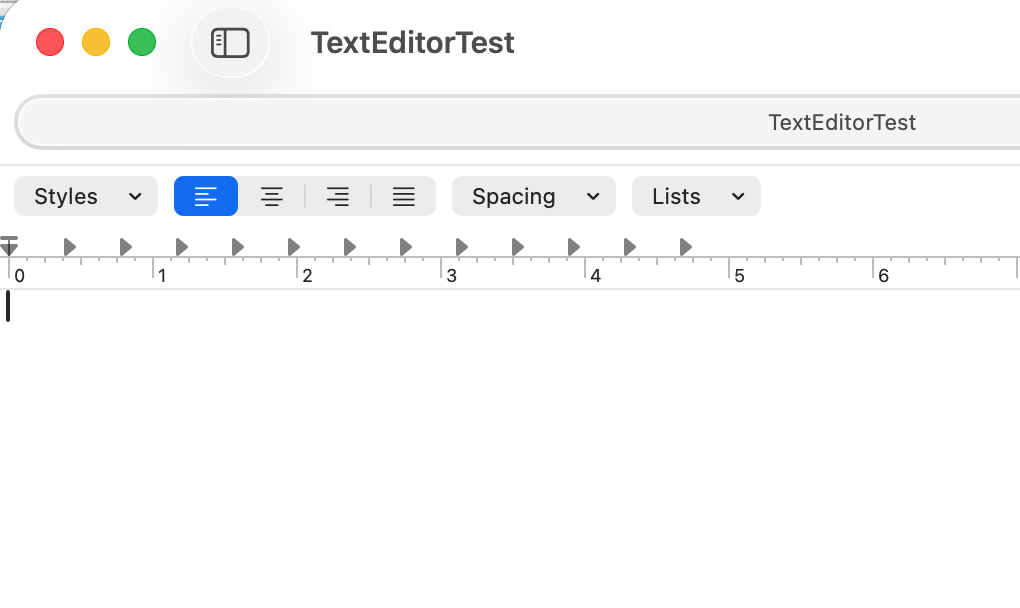
If your app has a sidebar, the sidebar covers up the formatting controls on the left side of the text editor and the left part of the ruler view.
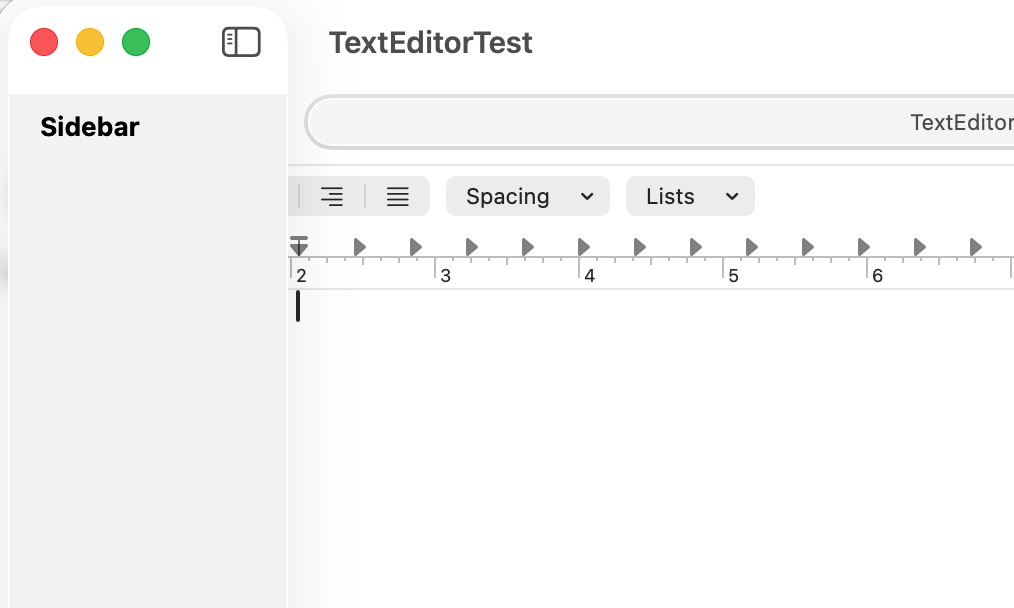
Someone using the app has to hide the sidebar to apply a paragraph style to the text in TextEditor. You have to use NSTextView to keep the sidebar from blocking the formatting controls.
File exporter returning folder URL
I wanted to export a document to PDF in an app I was developing. I used SwiftUI’s .fileExporter to get the URL for the exported PDF. I tried to create a Core Graphics PDF context to create the PDF, supplying the URL from the file exporter. The app kept crashing, and I saw the following error message in Xcode’s console:
CGDataConsumerCreateWithFilename:
failed to open /path/to/fileExporterURL
for writing: Is a directory.
The file exporter was returning a folder URL instead of a file URL so I couldn’t create the PDF context. On Mac I could work around the issue by using NSSavePanel. NSSavePanel returns a file URL for a PDF file. iOS doesn’t have an equivalent to NSSavePanel so I couldn’t export a PDF in the iOS version of the app.
SwiftUI allows saving documents in unwanted file formats
I developed a SwiftUI app for Mac and iOS that lets writers publish their own ebooks. The app has a custom document type for book documents, and people can publish an EPUB book from the app.
To allow publishing an EPUB book from the app, I had to add .epub to the list of writable content types for the SwiftUI document type. Otherwise the published book would have the file extension for my app’s document type instead of .epub.
static var bookDocument: UTType {
  UTType(importedAs:
    "com.CheckSimSoftware.book",
    conformingTo: .package)
}

static var writableContentTypes: [UTType] {
  [.bookDocument, .epub]
}
The problem I ran into was when people saved the document in the Mac version, the Save panel showed a File Format menu that let people save the document as my app’s document type or as an EPUB file. If someone chose EPUB, they wouldn’t be able to open the document.
SwiftUI provides no way to limit document saving to the app’s document type for Mac apps. An app developer has two options for saving documents in apps that can export to additional formats.
- Live with the File Format menu in the Save panel and tell people to save only in the default format.
- Force users to manually change the file extension for exported files.
I filed a bug report about this issue in December 2022, FB11876082. The issue has not been addressed.