In Xcode 26.4 Apple added a Top Functions mode to the Time Profiler and CPU Profiler instruments to help you quickly find the functions where your app spends the most time. This article explains the Top Functions mode.
If you are new to time profiling with Instruments, read the following article:
Find the Slow Spots in Your Code with the CPU Profiler Instrument
The article covers the CPU Profiler instrument, but the material also applies to the Time Profiler instrument.
Switch to Top Functions Mode
Above the detail view is a set of three buttons.
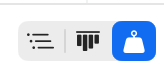
Click the right button (highlighted in blue in the screenshot) to switch to Top Functions mode.
The Top Functions mode sorts the call tree by the Self Weight column (Self Cycles in the CPU Profiler instrument) so the functions where your app spends the most time appear at the top of the call tree. Double-click a function you wrote to find the lines of code where your app spends the most time.
Flame Graph
Selecting a function from the call tree view shows a flame graph of the code paths that called the function. Focusing on a single function makes the Top Functions flame graph easier to read than reading the complete flame graph.
If you have never used Instruments flame graphs, the following article provides an introduction to them:
Instruments Flame Graph Introduction
Above the flame graph are two buttons. The left button, Callers, shows the default flame graph view. The default view shows the call stack in reverse, with the selected function at the bottom of the graph. The right button, Inverted Callees, inverts the flame graph.
Do you want to learn more about Instruments?
I wrote a book, Profiling Swift Apps, that shows you how to use Instruments to find and fix problems in your code. The book will help you make apps that run faster and use less memory. You can learn more about the book and download a sample at the following link: